





Want more from your Facebook marketing? Whether you're struggling with rising ad costs, shrinking organic reach, or just trying to keep up with how fast the platform changes, this guide covers both the fundamentals and advanced tactics to help you build a strategy that actually works in 2026.
Facebook advertising is the most popular avenue for social media marketing. The social network has grown into an ad network with substantial reach to empower brands of all sizes.
With over 3 billion monthly active users and Meta (the company that owns Facebook, Instagram, WhatsApp, and Messenger), generating over $138 billion in ad revenue in just the first nine months of 2025, Facebook remains the most powerful paid social platform for businesses of all sizes. If you want to boost sales and dominate your industry, roll up your sleeves and learn a few Facebook marketing tactics that will be a “must” to achieve success.
Why Facebook Marketing?
Businesses today have to plan their marketing strategies in order to successfully advertise their products and services. Facebook marketing starts with creating a business page on Facebook; this page acts as a channel of communication to maintain contact with and attract potential customers. However, simply posting news and updates to your social media profiles won’t cut it. After a major algorithm change in 2018, many brands are struggling to gain attention and engagement on Facebook. Organic reach has been throttled, which means people can “like” and “follow” your company but they’re not likely to see your posts unless you’re paying to have them seen.
To solve this problem (a problem you might say they created), Facebook provides an advertising platform that allows businesses like yours to create killer marketing campaigns. This is the only real way for businesses on Facebook to develop a fan base for a product, service or a brand.
How to Build a Facebook Marketing Strategy
Building a Facebook marketing strategy follows a clear process:
- Set your goals
- Set your budget according to your goals
- Define your audience
- Create a publishing calendar
- Optimize ad visuals for success
1- Set Your Goals
What results are you looking to achieve from Facebook? Are you trying to gain brand awareness or increase website traffic? Or do you want to bring in leads, who can then be directly contacted or taken to a website where they can purchase a product and convert as a customer. Setting goals is how you make sure your strategy is catered to your specific needs. Some goals worth considering:
- Brand awareness: Use Facebook as your go-to source for introducing your brand to new audiences. 68% of consumers follow brands on social media to find out about new products or services.
- Customer loyalty: 51% of consumers say the most memorable brands on social media respond to customers. Facebook gives you the platform to do exactly that.
- Sales and conversions: The average conversion rate on Facebook across industries is 8.25%, making it one of the highest-performing paid social channels when targeted correctly.
- Recruiting: Facebook can also support hiring efforts by showcasing your brand values and culture to attract top talent. Once you have determined your goals, you can adjust your Facebook marketing strategy accordingly.
There is no one-size-fits-all Facebook marketing strategy. Once you have determined your goals, you can adjust your Facebook marketing strategy accordingly.
2- Set Your Budget According To Your Goals
The next step in your Facebook marketing strategy is to plan your monthly budget. When it comes to a budget, a typical Facebook marketing campaign will contain budget allocation for Page-like ads, Conversion or Lead Generation ads, boosted posts, and content creation and development.
- Page like ads are the ads that grow your following on Facebook. Having a large following can be beneficial to your business in many ways.
- Conversion ads generate sales and leads who can be turned into customers.
- Boosting posts means more of your followers will see them. You can also boost posts to audiences outside of your followers.
You’ll want to look back to the initial goals and decide which features to budget for. If you are willing to invest in your posts and ads, Facebook can put your business in front of people who may have otherwise never heard of it.
3 -Define Your Audience
One of the major advantages of Facebook marketing is the ability to target highly specific markets, Facebook precision targeting options include:
- Recent purchase behavior
- Life-event targeting
- Custom audiences to nurture leads and build loyalty
- Create audience targets
- Geographic, demographic, behavioral, income, and interest-based layering
Facebook now leans heavily on its AI feature, Advantage+, to analyze your campaign as a whole, your objective, company, product, assets, and destination, and determine the most relevant users automatically.
4- Create a Publishing Calendar
Maintaining a regular posting schedule is an important part of finding success with Facebook. “A content calendar is the most effective way to maximize your efforts while minimizing the time spent on Facebook marketing,” said Dan Towers, senior manager of digital marketing at marketing and advertising firm Arcane. “You can plan out content at one time and by using a scheduling program, like Buffer or Sprout Social, you are able to set it and forget it,” he added. “But don't actually forget it—still monitor your posts and focus on community management. Your customers will appreciate it.”
Best practices for your content calendar:
- Mix your formats: Rotate between photos, videos, Reels, Stories, and text posts to keep your feed dynamic and satisfy the algorithm.
- Use content themes: A weekly Q&A every Thursday or behind-the-scenes content on Fridays for example. This makes consistency easier to maintain.
- Feature your customers. UGC, polls, and questions shift the content creation burden off your team and drive higher engagement.
5- Optimize Ad Visuals for Success
Here are a few tips to remember while making content for Facebook:
- Facebook posts that have an image or a video typically get twice the engagement of posts without images.
- People’s eyes are naturally drawn to images with faces in them.
- Only 15% of Facebook videos are watched with the sound on. Make sure your video conveys the right message without the use of sound.
- Ads should have strong calls to action (CTAs)
- It is recommended to have at least two variations for an ad, one being on a 1:1 ratio, and the other on a 9:16 ratio. Keeping the images/videos on a high resolution is always a must.
Advanced Facebook Marketing Tactics
Successful advertising starts with the right strategy and positioning. Don’t deliver sales-based ad campaigns straight to cold audiences of potential customers. They don’t know, like, or trust you yet, so you won’t see consistent and sustainable sales or leads from your campaigns. Here are some tips about how to target the right audience on Facebook, as well as some tools you'll find to make your campaigns more effective.
Pixel Sharing or Partner Data Sharing From Partner Sites
One of the key components of scaling Facebook ad campaigns is targeting, and specifically finding new audiences. An underused tactic is getting pixel access from other sites in your industry. Develop partnerships with high-traffic websites that attract your audience, and either share their pixel or install one from your account for a set period. This gives you a brand new, highly relevant audience that can be less expensive to target than standard options.
Event-Based Lookalike Audience
You can create multiple types of “lookalike audiences.” Essentially, you give Facebook a source audience (a “seed audience”) and Ads Manager will create an audience of people with similar characteristics.
The most efficient and effective way to do this is to create a custom audience from website events. Event-based Lookalike Audiences allow you to record the actions and behavior that matter most to you (such as purchases or leads). You can create a whole new lookalike audience by using a website custom audience (event-based) as your Source Audience.
Third-Party Tag Integration
The integration tool within Business Manager makes setting up the Facebook pixel process much easier. Businesses can implement the Facebook pixel without touching the code to their website. Click on the link for each platform to see step-by-step instructions:
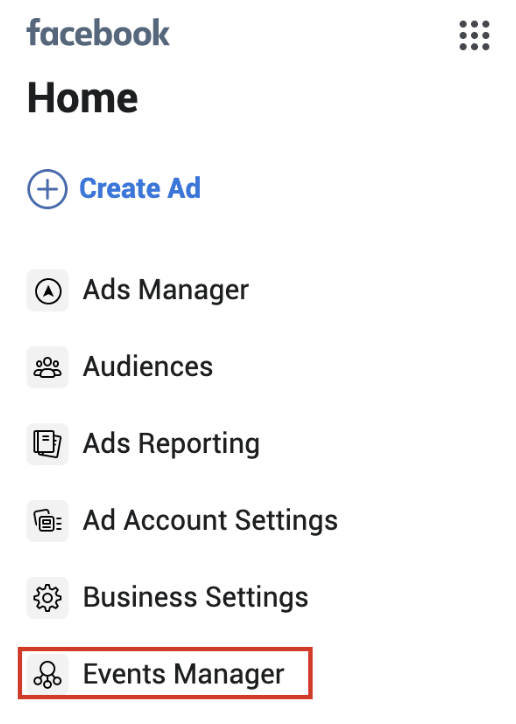
First, select “Events Manager” in the Facebook navigation sidebar.
Click “View Setup Instructions” to see how to create your pixel.
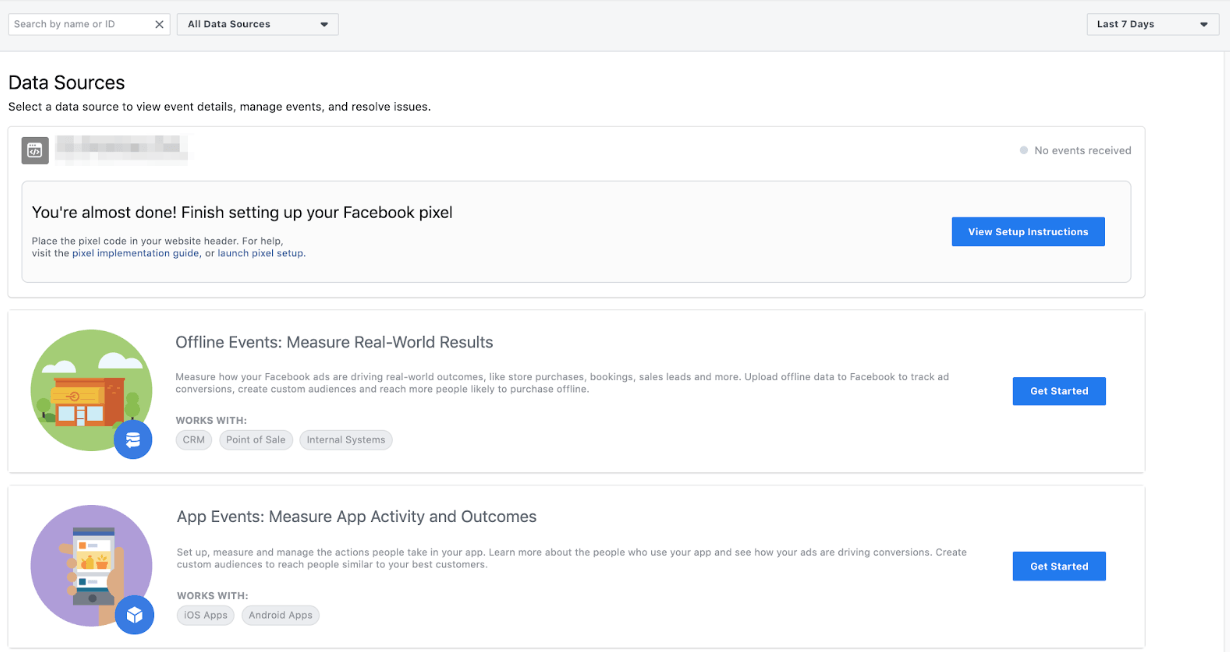
Follow the steps to get started and then use the Facebook Pixel Helper (a chrome plugin) to confirm that your conversion pixel is firing properly.
Audience Insights
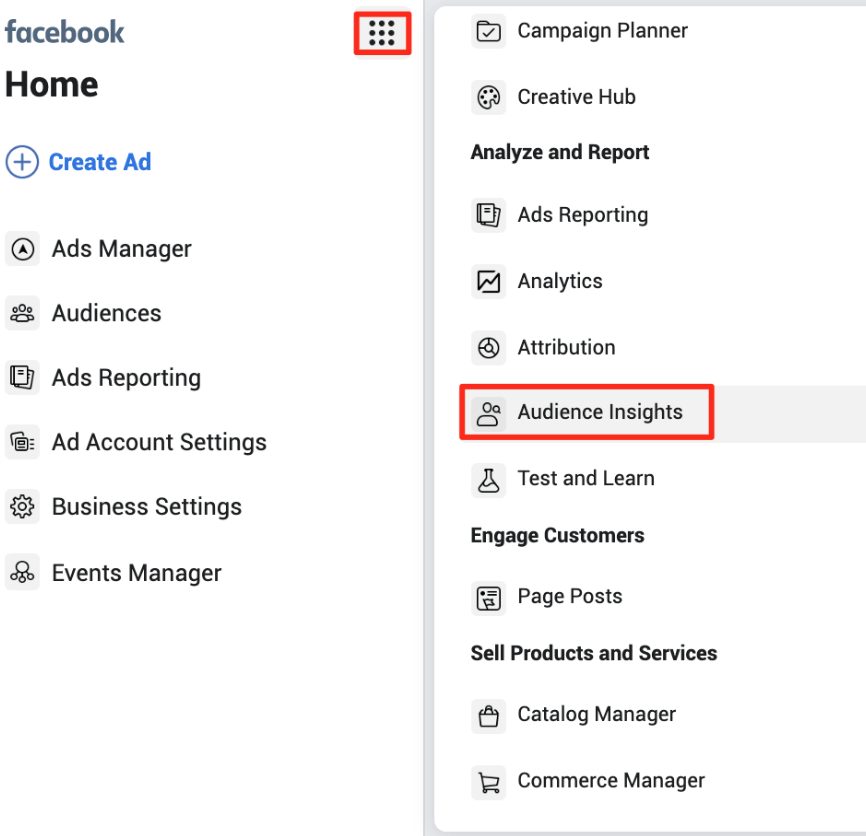
Facebook Analytics is no longer available, but Audience Insights is. Check out this tool by going to the navigation menu and scrolling down to “Analyze and Report” > “Audience Insights”.
You can also see Pages that are likely to be relevant to your audience based on their interests and how likely your audience is to like these pages (versus the rest of Facebook).
Using LinkedIn for Better Facebook Remarketing Campaigns
This remarketing trick is especially good for B2B. It can be difficult to use interest-based targeting to find new audiences on Facebook. LinkedIn might be a much better network to find the right people to target since LinkedIn has much better company, job title, and industry data.
What you can do is launch a top-of-funnel campaign on LinkedIn to your highly targeted audience with a link to a specific page or blog post on your website. Then you can set up a middle or bottom-of-funnel retargeting campaign on traffic to that page/blog post on Facebook where you can get less expensive CPCs and a higher conversion rate. Even if you're not in B2B, this strategy can still work with other ad networks like Quora, Reddit, TikTok, or even Google Ads, too.
Campaign Budget Optimization
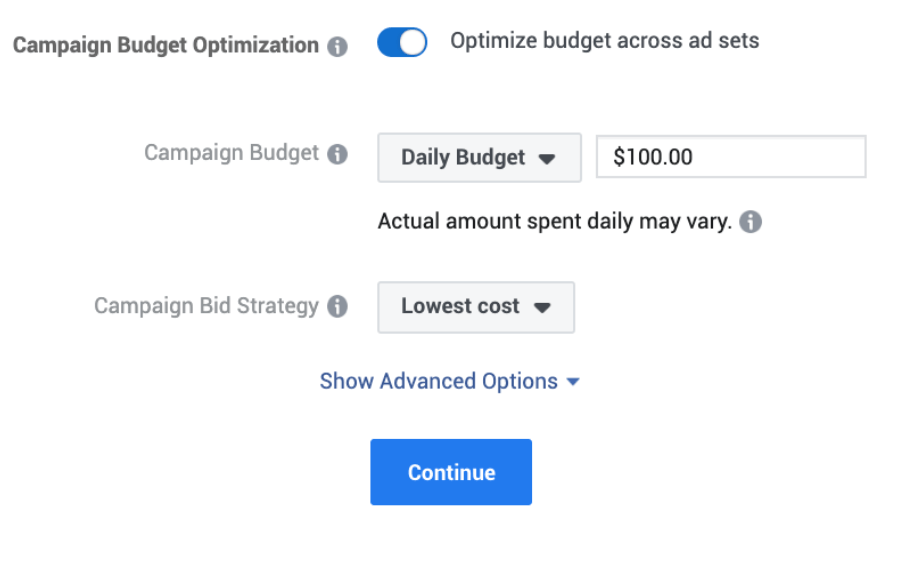
By setting one central campaign budget across multiple ad sets, Facebook can distribute your budget to the ad sets that are performing best. “Campaign Budget Optimization” allows you to do this when creating a new campaign and can be applied to either daily budgets or lifetime budgets.
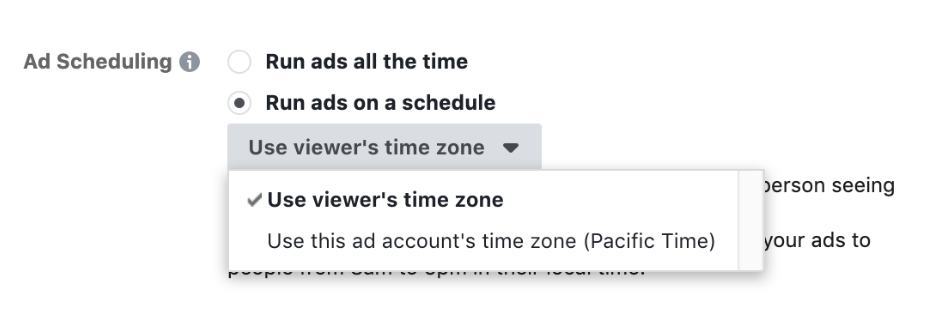
Ad Scheduling
When creating a new campaign, you’ll see the option to run ads all the time or run ads on a schedule after you have set your lifetime budget.

The remaining ad scheduling options must be set within each ad set.
Location Targeting
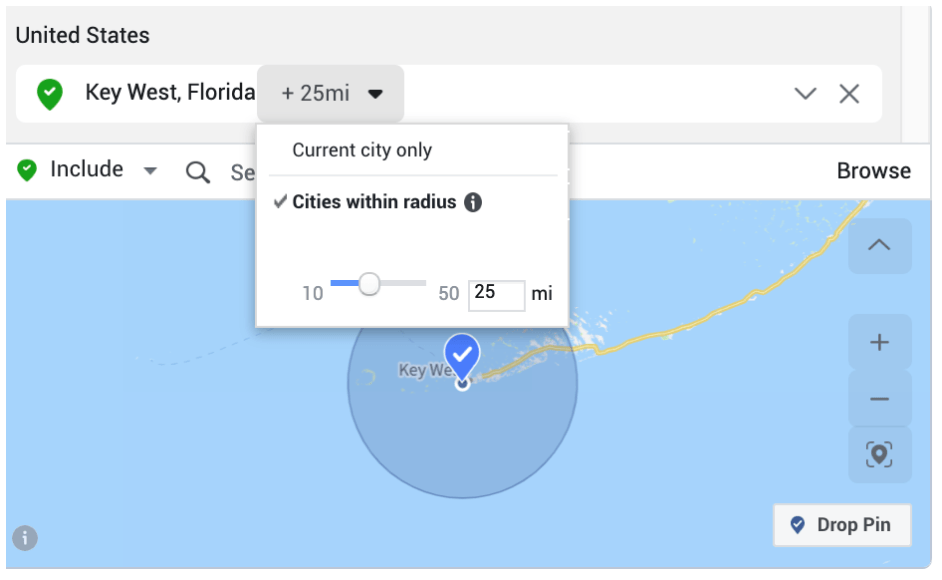
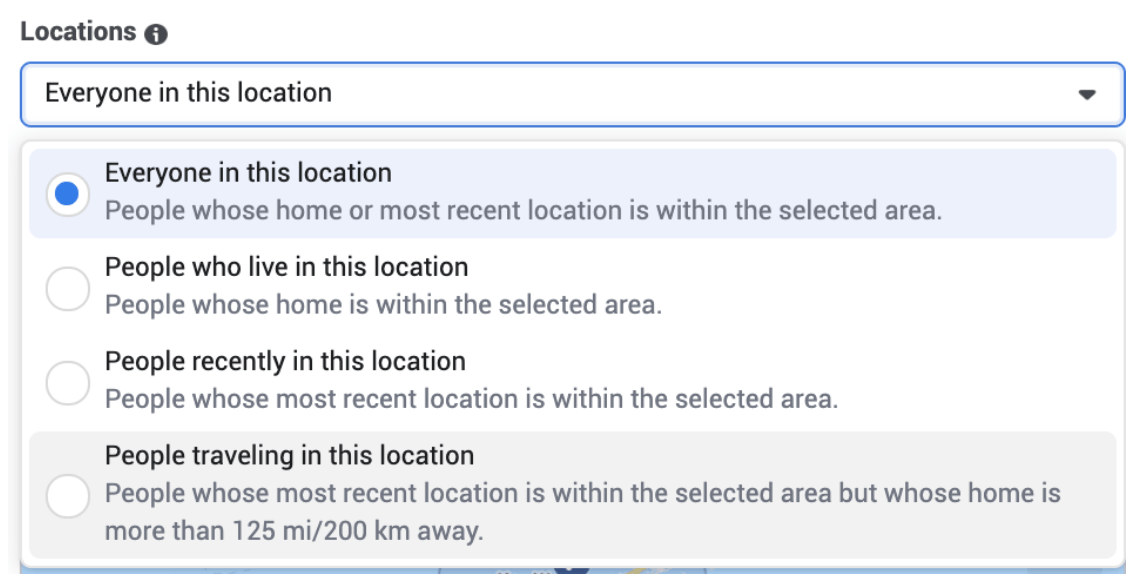
Location targeting lets you select radius targeting or target by city. Additional settings include: Everyone in This Location, People Who Live in This Location, People Recently in This Location, and People Recently Traveling in This Location (useful for targeting tourists, defined as people whose home is 125+ miles away).
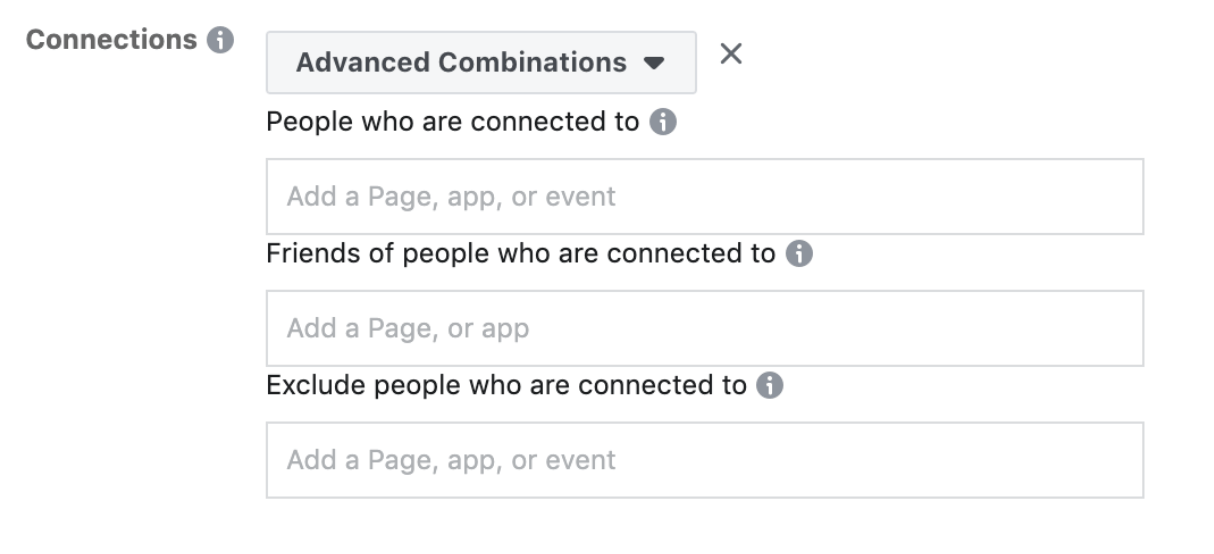
Connections
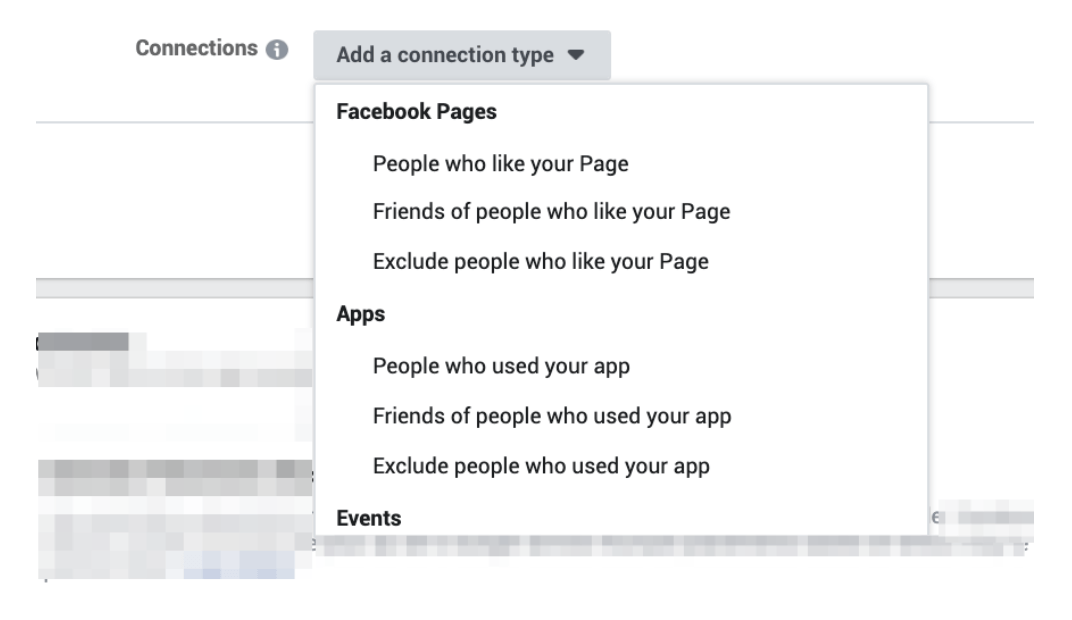
You can target people who like your Page and friends of people who like your Page. You can also exclude people who like your pages. You can target (or exclude) people who have responded to your events, or you can create different combinations of these options as well.
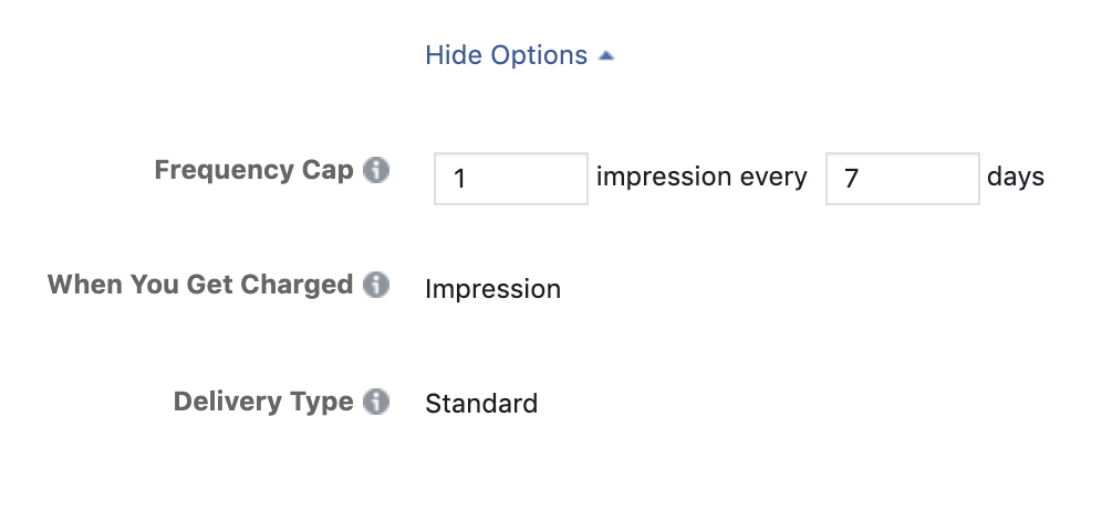
Frequency Cap
The default setting for your ads’ exposure is one impression every week. If you need to limit impressions in Reach or Brand Awareness campaigns, you can make this window longer or shorter with Frequency Cap. In the “Budget & Schedule” section of Ad Set Targeting (when using an Awareness campaign), you’ll see a “Show Advanced Options” button. Once you click this, you’ll see the Frequency Cap options.
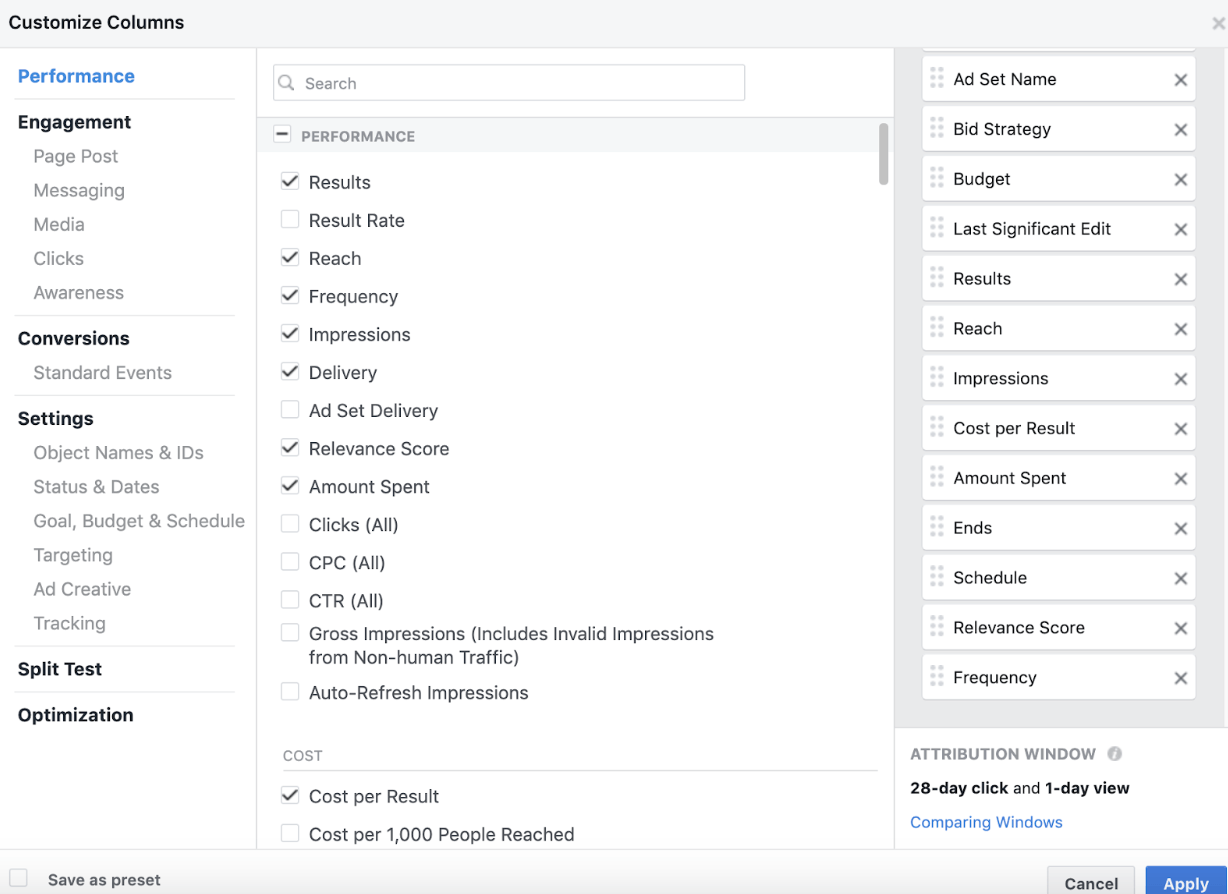
To see your Frequency on current ads, edit your “Account Overview” columns to include Frequency.
Block Lists & Publisher Lists
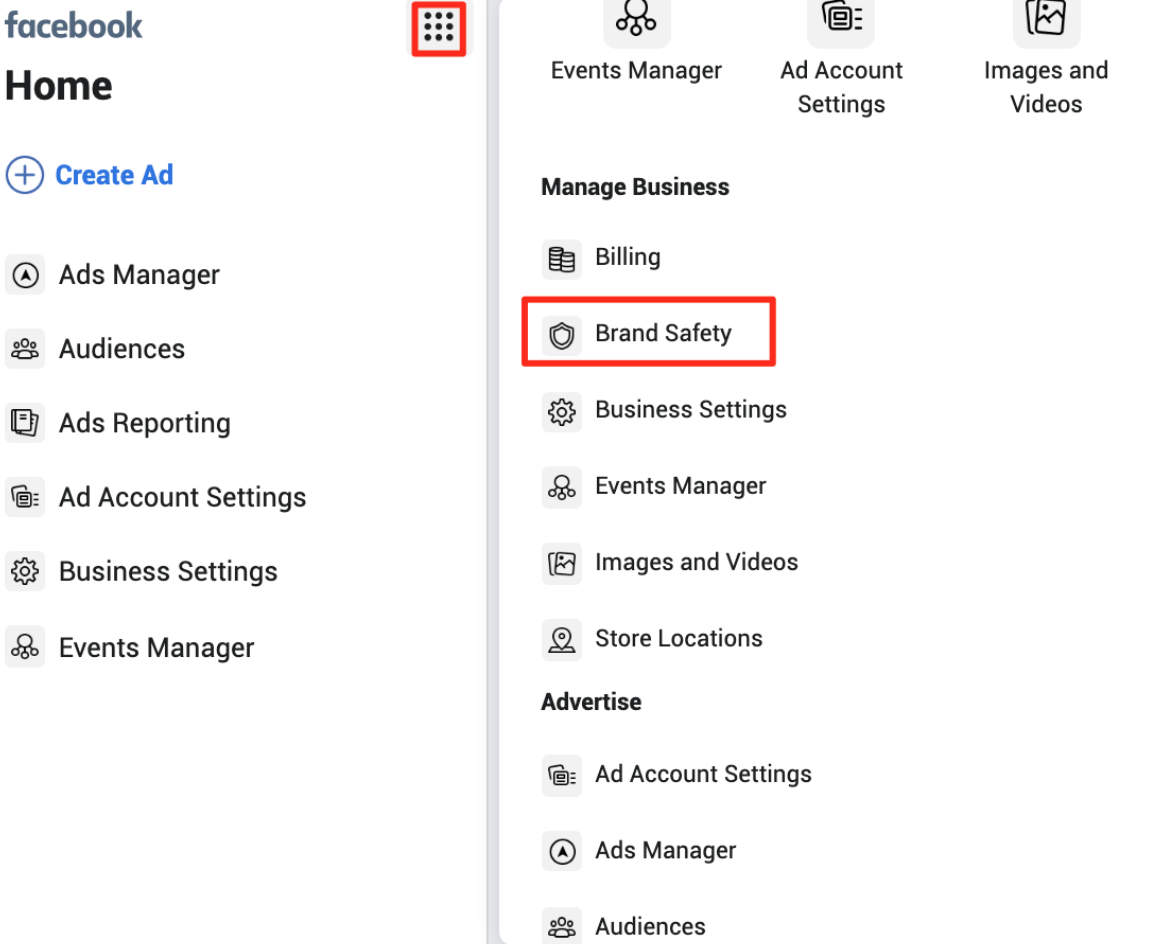
Facebook recommends regularly reviewing its Publisher List of websites where your ads might appear. If you identify URLs that you don’t want your ads to appear on, you can add them to your Block List. You’ll find your Block List, Publisher List and Publisher Delivery reports in the “Brand Safety” section of the navigation menu.
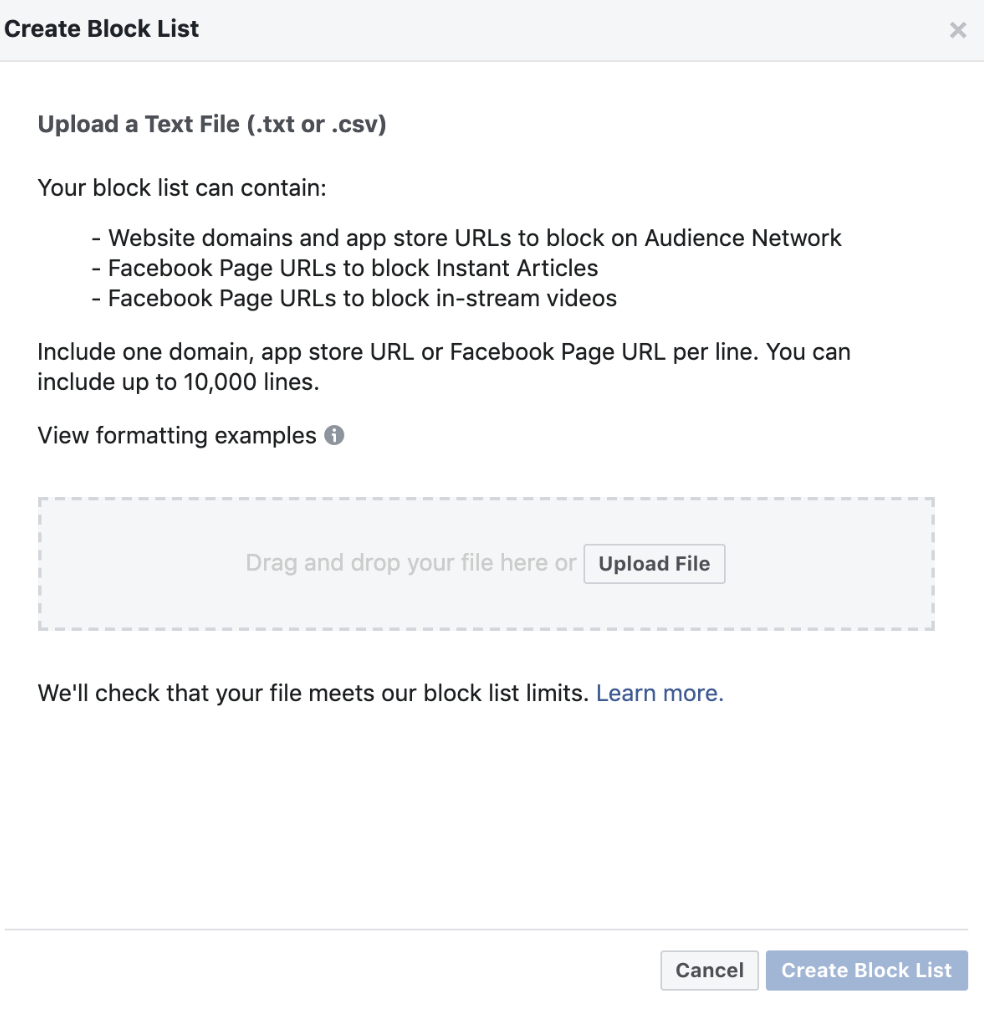
Navigate to the “Block List” page and select the green “Create a Block List” button.

Make sure your list is saved as a .txt or .csv file. Upload it and click “create Block list” to finalize.
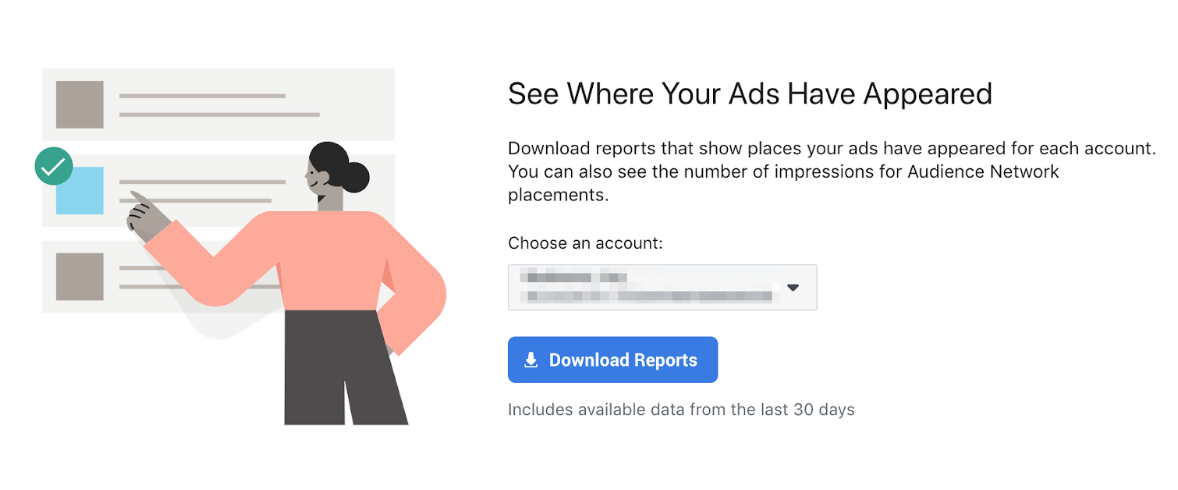
The Publisher Delivery report shows you a summary of each ad type, where it appeared and how many impressions that placement received in the last 30 days.
Identify the URLs and pages you want to exclude, then save the URL column in your file.
Automated Rules
If you're not using automated rules, you're missing out on a lot of efficiency gains and time savings. Automated rules are not that hard to learn either. The most useful rules to set up are to automatically pause underperforming ads/ad sets and automatically increase the budget of high performing ad sets. With these two rules, you can focus on creating a lot of different ads/ad sets and launch them all confident that the automated rules are going to pause the bad ones and increase the budget on the good ones - all automatically of course.
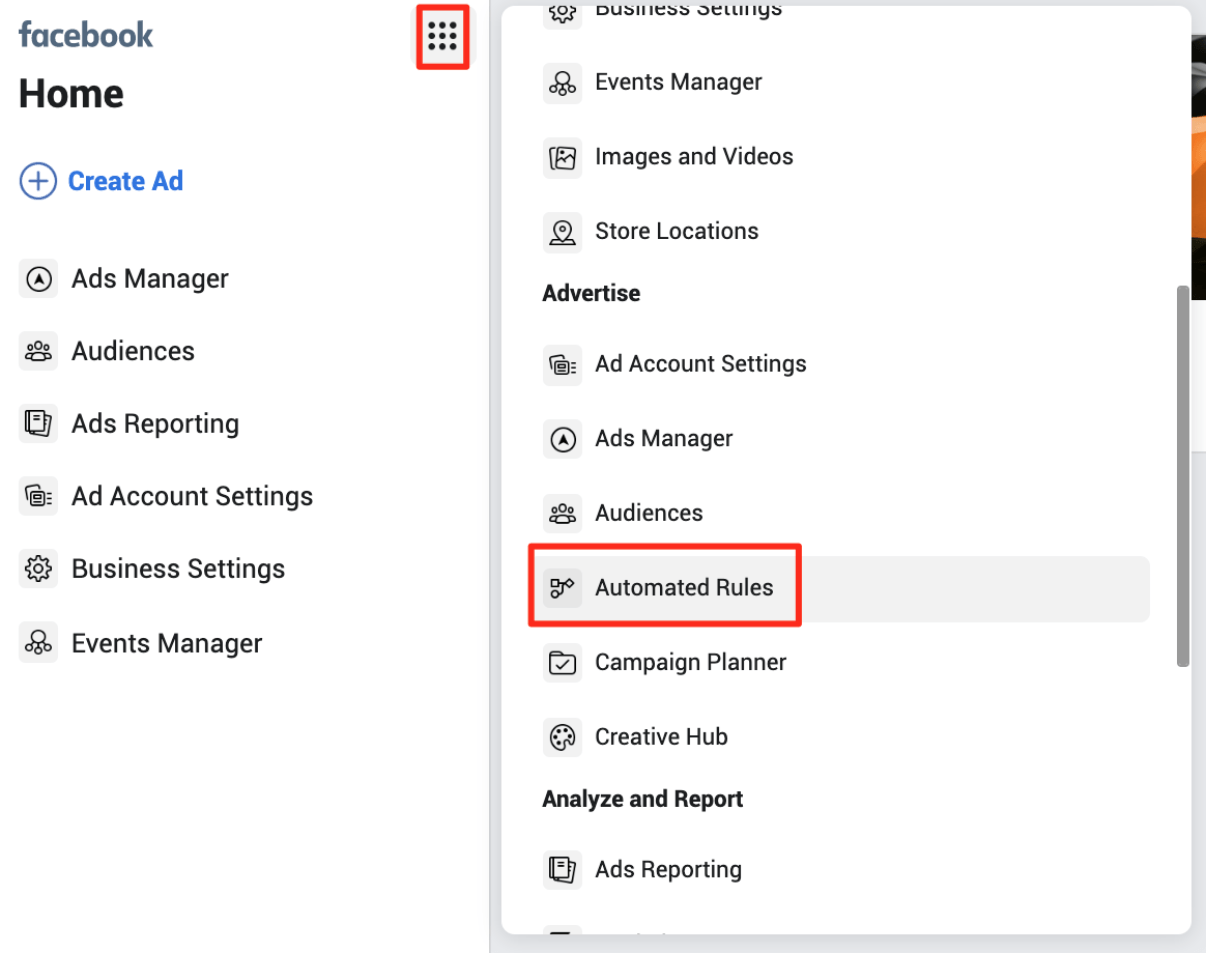
“Automated Rules” (under “Advertise” in the navigation menu) are useful when activating, pausing, and managing campaigns. Automated rules are a great way to leverage automation in Facebook without giving up too much control.
Click the green “Create Rule” button in the top right corner to apply your rule to all active or paused campaigns, all active or paused ad sets, or all active or paused ads.
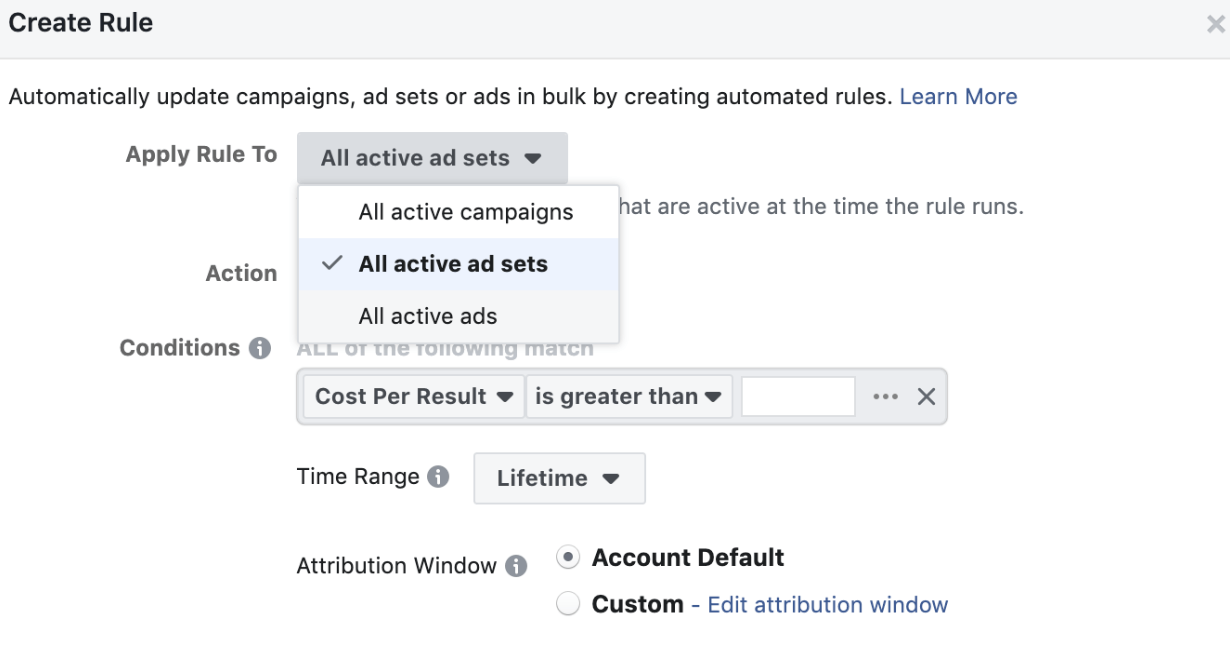
In the “Action” field, you can select to pause, activate, send a notification, adjust budgets or adjust bids.
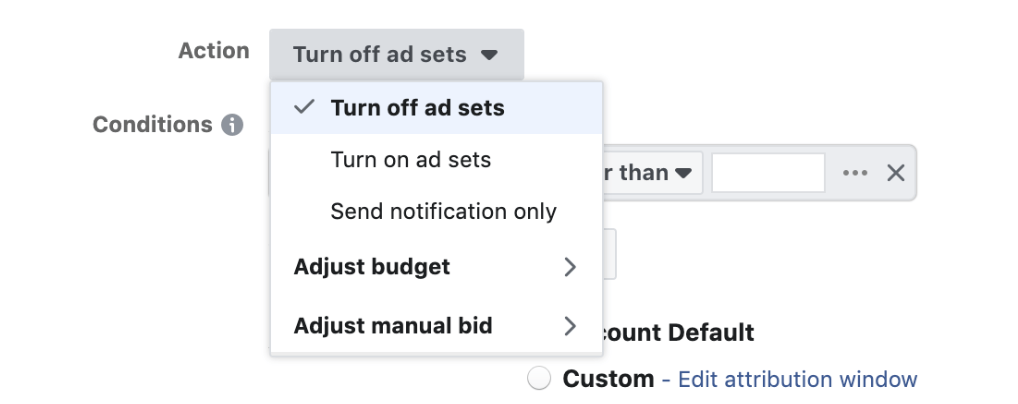
There are countless combinations of automated rules you can create, including:
- Update your CPA or other cost goals by target field
- Adjust bids in the same manner as budgets.
- Set bi-weekly, weekly, daily and hourly options for action frequency
- Add conditions, such as “cost per result is greater than $50”, with a time range that can be from today all the way to the lifetime of the account.
- Adjust the attribution window if you would prefer a different window than what your account is currently using.
Lowest-Cost Cap Bidding
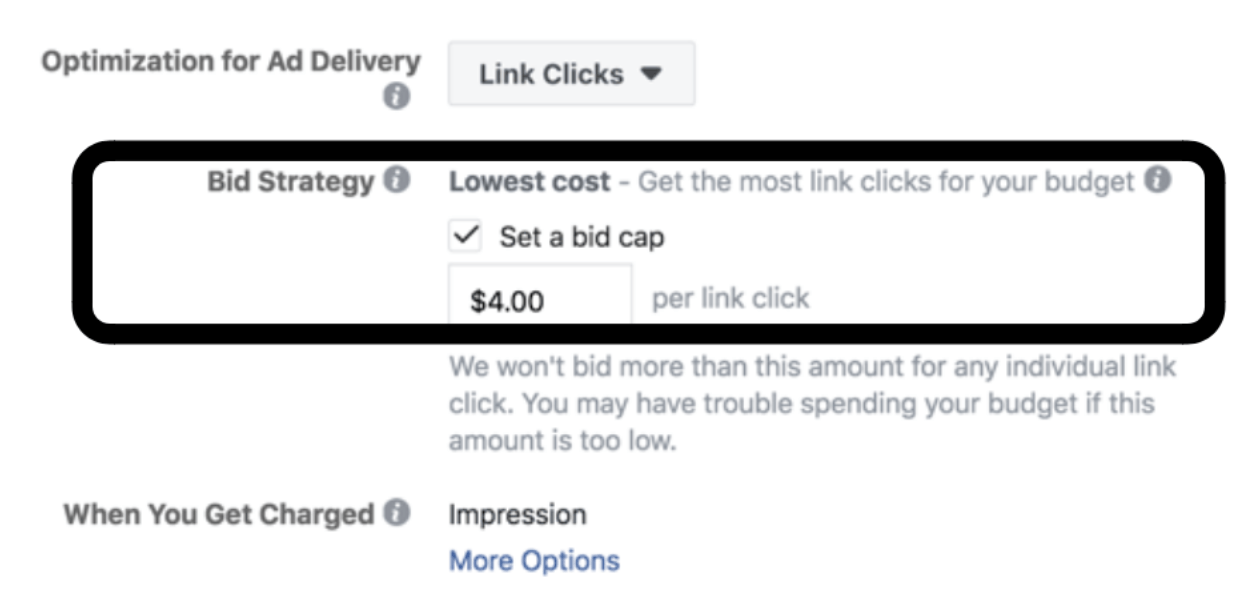
Facebook has a default mode on when it comes to bidding in the auction. This is intended to achieve the lowest cost per result possible by automatically bidding on your half. Your business can improve campaign performance by changing the auction bidding from “lowest cost” to “lowest cost with a cap”. This accomplishes two goals:
- Cost control: You prevent campaign costs from rising above a set amount that you’re comfortable with.
- Boost Ads Distribution: You can increase your ads distribution within your targeting by setting your bid cap at four to five times the amount of your target cost per optimization.
When you boost ads distribution, Facebook sets itself to target the highest-quality part of the target audience. This helps you to successfully outbid your competitors.

Placement Asset Customization Tool
Facebook’s Placement Asset Customization tool lets you increase the relevancy of your ads, helping boost their engagement rate and effectiveness. To use this feature, select “Edit Placements” when you’re at the ad set level of your campaign. Then select “All Placements” under “Asset Customization”.

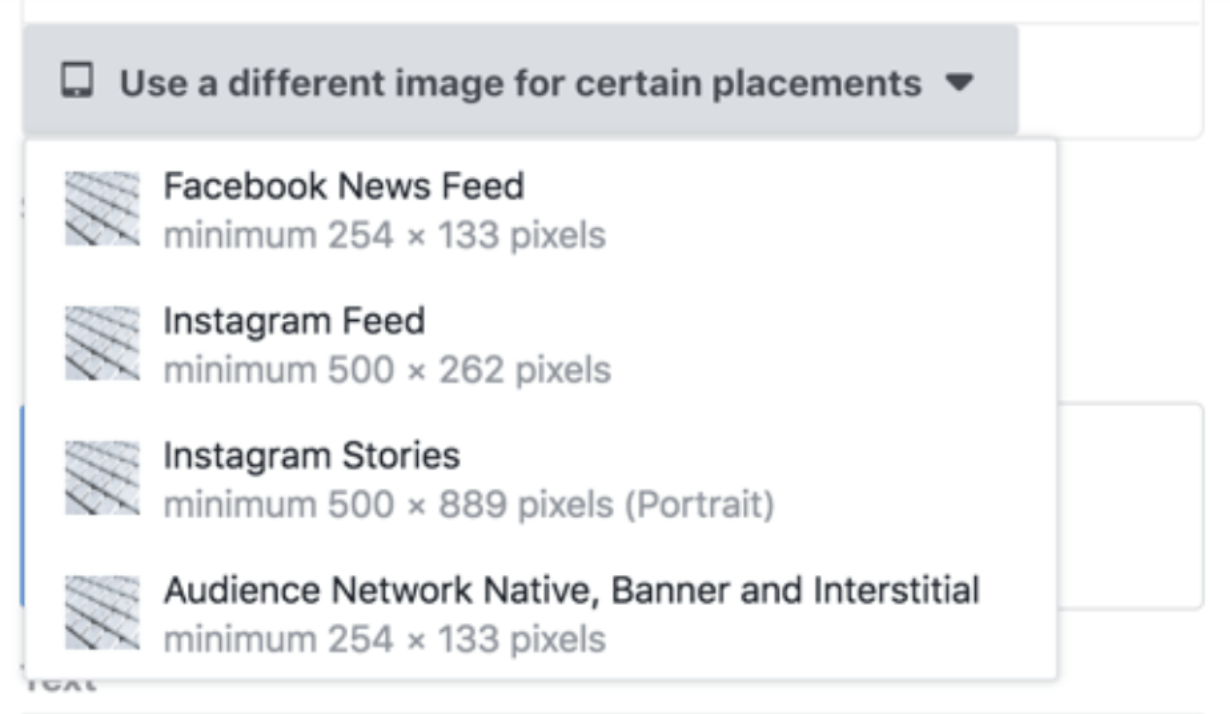
When Placement Assistance is enabled, you can adjust your creative for the following placements:
- Facebook Feed
- Instagram Feed
- Instagram Stories
- Audience Network Native, Banner, and Interstitial
- Audience Network Rewarded Videos
- Facebook Messenger Inbox
- Threads Feed
Once you are done with choosing the relevant placements, move down to the ad level, where you will find two two additional options:
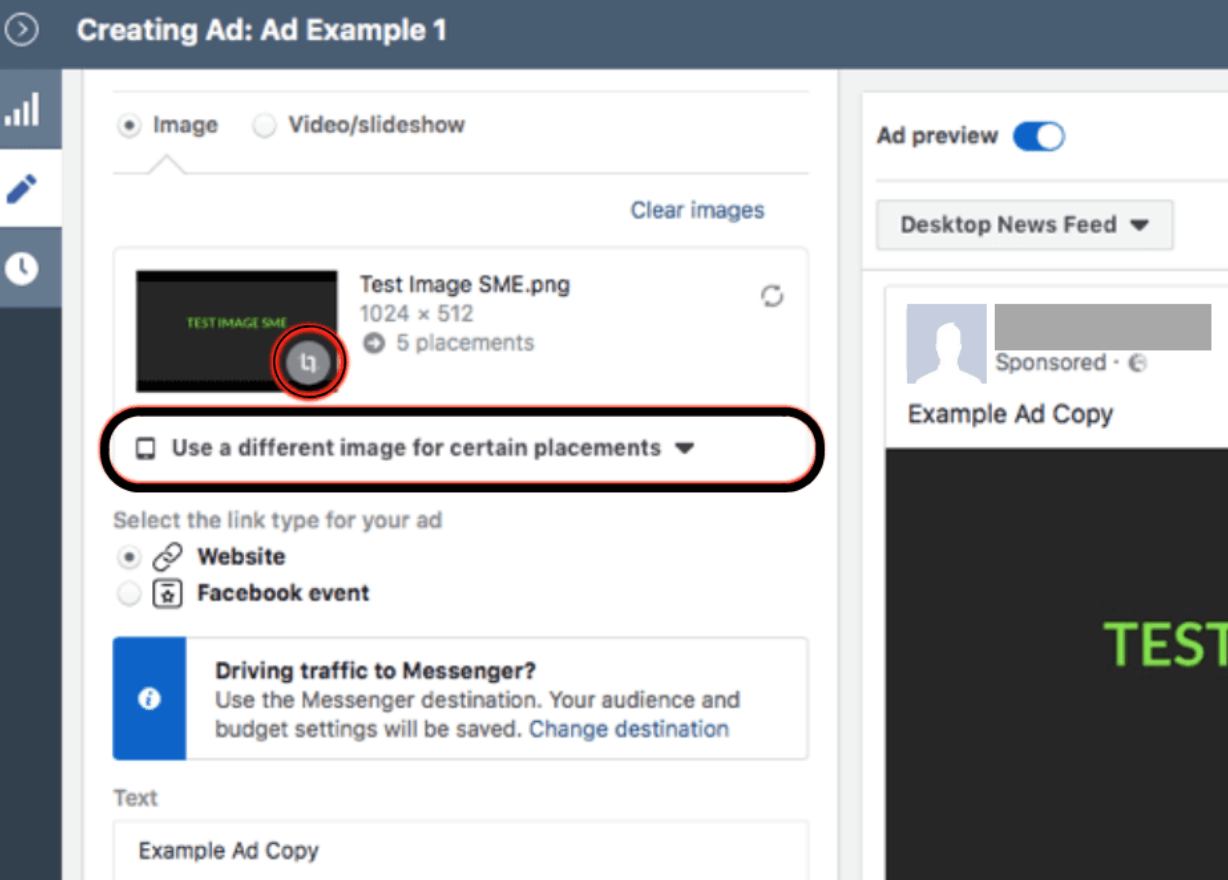
- Option 1: Crop a single ad image to fit properly with the native format of each platform you are targeting. Although you can use any 1:1 or 16:9 creative on vertical formats, Facebook suggests that you always use both 1:1 (for feed placements) and 9:16 (for vertical placements. This helps improve ad performance, as the visual part (image/video) fits perfectly on each placement.
- Option 2: Use different creatives for each platform. To do this, select “Use a Different Image for Certain Placements”
The Split Testing Tool
Facebook’s split testing tool lets you identify your best-performing ads so you can improve future campaigns. Run A/B tests on audiences, creatives, placements, and copy, even small sums spent on testing before a full launch can meaningfully improve your ROAS.
Facebook Reels & Short-Form Video
Facebook Reels are one of the fastest-growing content formats on the platform and represent a significant organic reach opportunity — particularly for brands that have seen their standard feed posts underperform in recent years.
Reels are short-form vertical videos, similar in format to Instagram Reels and TikTok. Facebook actively prioritizes Reels in distribution, meaning they're more likely to reach non-followers than a standard post. Key tips:
- Hook viewers in the first 1–2 seconds. Most scroll-stopping happens immediately.
- Use captions. The majority of Reels are watched without sound.
- Repurpose your best-performing Instagram or TikTok content as Facebook Reels, the audiences often don't overlap.
- Keep them between 15–30 seconds for maximum completion rate.
- Use trending audio where relevant, but make sure the visual content stands on its own.
Automation & Chatbots
Chatbots and automated response tools make this scalable without requiring a full-time social team.
Facebook's native Messenger tools allow you to set up automated replies for common queries, FAQs, and lead qualification flows. More advanced bots can recommend products based on what a user searches for on your Page, for example, surfacing shoe ads when someone searches for "winter footwear."
Key uses for Facebook chatbots:
- Answering predictable customer service questions 24/7
- Qualifying leads before routing to a sales team
- Recommending products or content based on user behavior
- Responding to compliments and complaints with consistent, on-brand messaging
- Tools like ManyChat and Chatfuel integrate directly with Facebook Pages and offer more advanced flows than Meta's native options.
Tools & Analytics
To track performance and manage your Facebook marketing strategy effectively, here are the core tools:
- Meta Ads Manager: Create reports on ad performance including carousel views, CTR, and website conversions.
- Events Manager: Analyze visitor actions on your website such as add-to-cart and purchases.
- Meta Business Suite: View combined data across Facebook and Instagram — demographics, content engagement, and paid ad performance.
- Google Analytics: Cross-reference Facebook-driven traffic and conversions with on-site behavior.
Effective Facebook marketing requires a strategic approach that goes beyond simply posting content. With organic visibility continuing to decline and Meta's AI tools taking on more targeting decisions, the brands that win are the ones who feed the algorithm good inputs; strong creative, clear objectives, well-structured campaigns, and then let it optimize.
If you’re looking for assistance with social media marketing, our team at Symphonic is happy to assist your business achieve its goals and make more money.





.png)






