





Key takeaways
- Native advertising is paid content designed to match the format and style of the content around it.
- Disclosure labels are the clearest signal. Look for "Sponsored," "Promoted," "Paid Content," or "Partner Content" near the headline.
- Placement is predictable. Native ads cluster in end-of-article recommendation widgets, in-feed social posts, and top-of-page search results.
- Hovering over a link shows the destination URL. If it routes through a native ad network, the placement is paid.
- On social platforms, the three-dot menu shows "Why am I seeing this ad?" only on paid posts.
Related Content: Native Advertising Examples Native vs Sponsored How Native Advertising Works
Chances are you've come across native ads today without realizing any of them were ads. Native ads are paid content built to match the look, feel, and format of articles, social posts, search results, or recommendation widgets.
A strong native ad does not look like a loud banner or pop-up. Instead, it may appear as a suggested article, sponsored post, promoted search result, or recommended product. Because they are designed to feel natural, they can be harder to spot at first glance.
To identify native ads, look for small disclosure labels such as “Sponsored,” “Promoted,” “Paid Content,” “Ad,” or “Partner Content.” You can also watch for clues like repeated placement patterns, slight design differences, brand mentions, call-to-action buttons, and social tags that signal the content was paid for.
Here are four signals that can help you identify native ads:
1. Look for Disclosure Labels
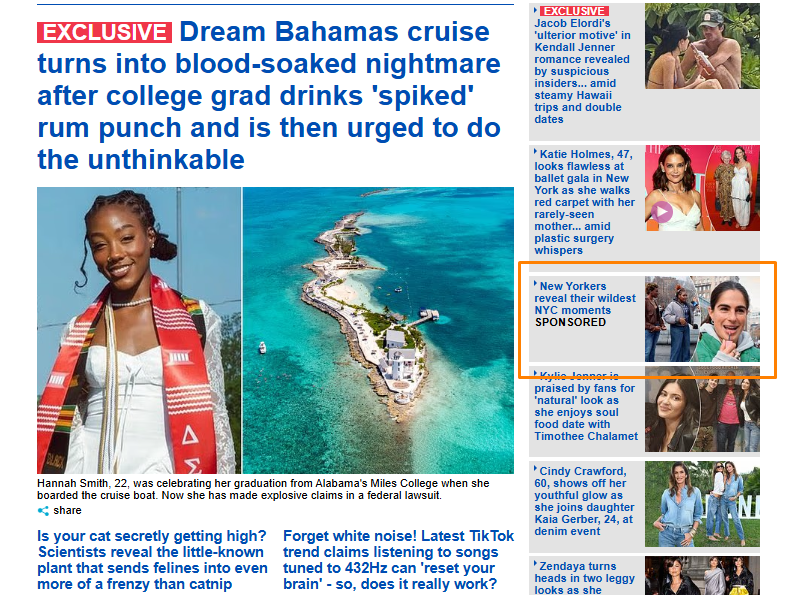
FTC guidance directs advertisers to disclose paid content clearly and prominently whenever the format could mislead a reasonable consumer. Reputable publishers apply labels consistently to limit that exposure. Scan the top, bottom, and corners of the content for any of these phrases. They are not interchangeable, and the wording affects how readily readers register the content as paid.
The label is usually small and grayed-out on purpose. Advertisers want it visible enough to satisfy regulators and invisible enough that it doesn't kill the click-through rate. The wording also tells you something about the placement. It helps to know the difference between native advertising and sponsored content, because the two overlap without being interchangeable.
Quick top for marketers: When auditing your own creative, make sure the label sits in a consistent position across every placement. Inconsistent labeling is what triggers FTC scrutiny, not the ad itself.
2. Identify Placement Patterns
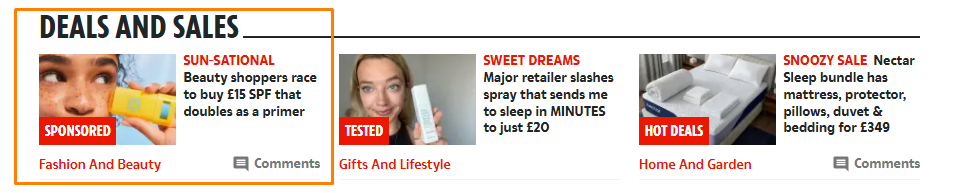
Native ads live in predictable spots. Once you know where to look, you start seeing them everywhere:
- Bottom of articles: Thumbnail grids at the end of news stories or blog posts with headlines like "Recommended for you," "From around the web," or "You might also like." These are almost always served by a content recommendation network.
- In-feed: Social media posts on Instagram, Facebook, LinkedIn, and TikTok that appear between organic posts from people you follow.
- Search results: The top few results on Google with a "Sponsored" tag above them.
hese cues get easier to catch with repetition. Working through native advertising examples across publishers and platforms is the fastest way to train your eye.
Quick Tip for marketers: Ad placement should also be considered as part of your media plan. End-of-article widgets are cheap and high-volume. In-feed social is where most testing happens because targeting is granular. Search native is where intent is highest and CPCs reflect it.
3. Check Design and Formatting
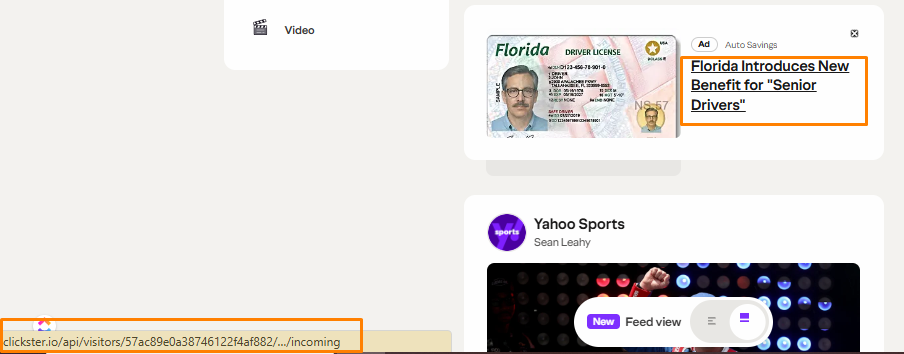
Native ads try to blend in, but advertisers still leave visual and textual fingerprints. Three things to watch for:
- Out-of-place language: The headline sounds more sensational or clickbaity than the rest of the publisher's editorial style.
- For example a headline like: "This Investing Trick Has Wall Street Furious"
- Different branding: Check the byline. If it lists a company name instead of a journalist, it's branded content.
- Hover the link: When you move your mouse over the link without clicking, the destination URL appears in the bottom corner of your browser. If it routes through a native ad network like Taboola or Outbrain before redirecting, you're looking at a paid placement.
Faster verification trick: Click the three-dot menu next to any post. If you see "Why am I seeing this ad?" as an option, it's a native ad. This menu item only exists on paid placements.
Quick tip for marketers: The hover trick is the fastest way to map a competitor's distribution. Hover, note the network, and you know which platforms they're spending on.
4. Watch for Social Media Tags

Social platforms have their own native ad indicators, usually small and grayed-out under the account name.
- Instagram and Facebook: "Sponsored" label below the username or page name.
- TikTok: "Sponsored" tag under the handle, sometimes paired with a "Learn More" button.
- X (formerly Twitter): "Promoted" or "Ad" label under the post.
- LinkedIn: "Promoted" tag below the poster's name.
Quick tip for marketers: Both Meta and LinkedIn have public ad libraries. Meta Ad Library and LinkedIn Ads Library allow you to search any brand and see every active ad they're running. The Meta Ad Library and LinkedIn Ad Library let you search any brand and see every active ad it is running.
Why does spotting native ads matter for marketers?
Because the same signals that identify an ad also reveal a competitor's media strategy. Native ads will keep getting better at blending in because the format works. Click-through and trust metrics beat traditional display by a wide margin, which is why ad spend keeps shifting towards it. The disclosure signals will stay though, because the FTC requires them and publishers don't want the legal exposure.
Train yourself to spot the four signals above, and you'll have a real-time read on where your category is spending, what creative is working, and where your own native budget should go.
Ready to Put Native Ads to Work?
Spotting native is the first step. The harder part is building campaigns that can compete with what you're seeing. Symphonic Digital builds and manages native ad strategies that allows for your budget to be as efficient as the format itself. If you're ready to stop watching your competitors run native and start running it better, contact us today.
Spotting Native Ads FAQs
Are native ads required to be labeled as ads?
Yes. Native ads must be disclosed whenever a reasonable consumer could mistake the placement for editorial content. The FTC does not require one specific phrase, but it treats some labels as clearer than others. The agency points to "Ad," "Advertisement," "Paid advertisement," and "Sponsored advertising content" as terms consumers understand. It has flagged "Promoted" and "Promoted stories" as ambiguous. Labels like "Presented by" or "Brought to you by" can fall short when the advertiser helped create the content. Wording still varies across placements, so the disclosure you see depends on the publisher.
What is the difference between native advertising and sponsored content?
Native advertising is the broader category, covering any paid placement built to match the format of its surroundings. Sponsored content is one format inside that category, usually an article or video produced with or for a brand. More on native advertising versus sponsored content.
Why are native ads harder to spot than banner ads?
Banner ads sit in dedicated slots with obvious borders and standard dimensions. Native ads use the publisher's own fonts, layout, and image treatment, so nothing visually separates them from editorial content. The disclosure label is often the only difference, and it is designed to be easy to overlook.
Which networks serve most native ads?
Content recommendation networks such as Taboola and Outbrain serve most end-of-article placements. In-feed native runs through the platforms themselves, including Meta, LinkedIn, TikTok, and X. Search native runs through Google Ads. Hovering a link and reading the destination URL usually reveals which network delivered it.
Can ad blockers remove native ads?
Ad blockers catch some native placements and miss many others. Recommendation widgets are often blocked because the network scripts are identifiable. In-feed social ads are delivered through the same infrastructure as organic posts, so blockers generally cannot separate them. Manual identification stays necessary on social platforms.
Why should marketers learn to spot native ads?
Identifying native placements shows where competitors are spending, which creative they are testing, and which networks they rely on. That read informs your own media plan without paid research tools. It also gives you a benchmark for auditing your own disclosure practices against larger publishers.

.png)
.png)


.png)






