





If you want more traffic to your online store without pouring money into ads, SEO for eCommerce is your most powerful lever. Done right, it brings in shoppers who are actively looking for what you sell, for free, month after month.
This guide covers everything you need to build a winning eCommerce SEO strategy, from keyword research to technical optimization and link building.
What Is eCommerce SEO?
eCommerce SEO is the process of optimizing your online store to rank higher in search engine results pages (SERPs) like Google and Bing. Higher rankings mean more visibility, more clicks, and ultimately more sales, all without paying for every visitor.
Unlike paid ads that stop the moment your budget runs out, SEO eCommerce marketing builds compounding value over time. Once your pages rank, they continue driving traffic with minimal ongoing investment.
Common eCommerce SEO tasks include keyword research, optimizing product and category pages, improving site architecture, creating content, and building backlinks from other reputable websites.
Why SEO for eCommerce Actually Matters
The numbers make the case clearly. Research from Backlinko found that the first organic result on Google earns around 27.6% of all clicks, while websites on page two receive less than 1% of traffic. That gap is enormous.
When your store ranks organically, you also build credibility. Shoppers tend to trust organic results more than paid listings, which means SEO-driven traffic often converts better. And compared to paid advertising, where you pay for every click, SEO is a significantly more cost-efficient channel in the long run.
How to Build an eCommerce SEO Strategy
1. Start With Keyword Research
Keyword research is the foundation of any eCommerce SEO strategy. You need to know exactly what your potential customers are typing into search engines before you can optimize your store to meet them there.
eCommerce keyword research differs from general SEO in one important way: you need to prioritize commercial and transactional keywords, not just informational ones. Someone searching "best running shoes under $100" is far closer to buying than someone searching "how do running shoes work."
How to find the right keywords:
- Google Autocomplete: Start typing your product into Google and note the suggestions. These reflect real search behavior. Try adding a space before your query or a letter at the end to surface more variations.
- Amazon Autocomplete: Amazon suggestions are product-focused and often reveal specific attributes buyers care about (size, material, price range).
- Related Searches: Scroll to the bottom of any Google results page to find related queries your audience is using.
- Competitor Analysis: Tools like Ahrefs or Semrush let you enter a competitor's domain and see every keyword they rank for. Find gaps you can exploit.
- Reddit and Forums: Browse subreddits related to your product niche. The language real buyers use in discussions often surfaces keywords you'd never find in a tool.
When evaluating keywords, balance three factors:
- Search volume: How many people search it monthly
- Keyword difficulty: How hard it is to rank)
- Relevance to your actual products.
Long-tail keywords, longer, more specific phrases, typically have lower competition and higher conversion rates, making them ideal starting points for newer stores.
2. Optimize Your Product and Category Pages
On-page SEO for eCommerce focuses primarily on your product pages and category (collection) pages, since these are your highest-value pages for driving purchases.
Title Tags and Meta Descriptions
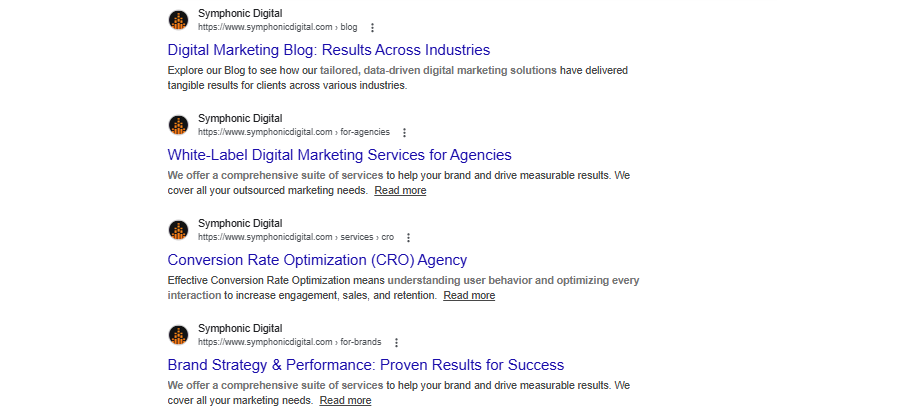
Your title tag tells both Google and shoppers what your page is about. Keep it under 60 characters, include your target keyword, and add a compelling hook — free shipping, a discount, or a key benefit. Meta descriptions don't directly affect rankings, but a well-written one improves click-through rates from the search results page.
Product Descriptions
Thin product content is one of the most common eCommerce SEO mistakes. If your page only has a manufacturer's copy-pasted description, Google has very little to work with. Write unique, detailed descriptions that highlight features, benefits, and use cases. The more substantive your content, the better Google can understand what you're selling and who it's for.
URLs
Keep your URLs short, descriptive, and keyword-inclusive. Use hyphens between words, avoid dates, and use lowercase text. A URL like /collections/dry-dog-food is far better than /collections/category-4832.
Image Optimization
Name your image files descriptively (e.g., leather-wallet-brown.jpg rather than IMG_4521.jpg), write accurate alt text for every image, and compress images before uploading to keep page load times fast.
Schema Markup
Adding product schema markup to your pages allows Google to display rich snippets in search results — showing star ratings, prices, and availability directly on the results page. This makes your listing more eye-catching and can significantly boost click-through rates.
3. Build a Clean Site Architecture
How your pages are structured and linked together affects both SEO and user experience. The goal is simple: any product should be reachable from your homepage within a few intuitive clicks.
A well-organized eCommerce site typically follows this hierarchy: Homepage → Category Pages → Product Pages. Your main navigation should link to your most important categories, and every product should be linked from at least one parent category.
This structure matters for SEO because most of your link authority flows through your homepage. Pages buried too deep in your site receive less of that authority and tend to rank lower as a result.
Good site architecture also prevents crawling issues. If Google's bots can't efficiently navigate your site, pages may not get indexed — which means they'll never appear in search results at all.
Practical tips:
- Add breadcrumbs to product pages so users (and search engines) always know where they are in your store
- Use strategic internal linking to connect related products and categories
- Noindex pages that don't need to appear in search results (like checkout confirmation pages)
4. Handle Technical SEO
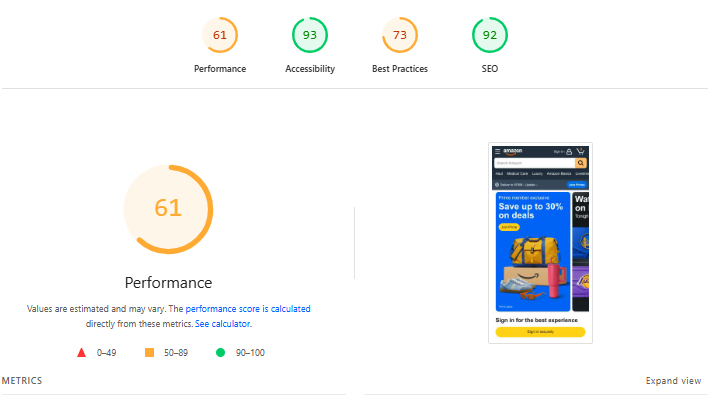
Technical SEO is the behind-the-scenes work that ensures your store is fast, crawlable, and secure. It won't win you rankings on its own, but technical problems can actively tank rankings you've worked hard to build.
Key areas to address:
- HTTPS : Your store must use HTTPS (indicated by a padlock in the browser bar). It's a confirmed Google ranking factor and essential for customer trust, especially when handling payment information.
- Page Speed: Slow pages kill conversions and hurt rankings. Use Google's PageSpeed Insights to diagnose issues. Common fixes include compressing images, minifying CSS and JavaScript files, and using a content delivery network (CDN) to serve pages from servers closer to your visitors.
- Mobile Optimization: Google uses mobile-first indexing, meaning it ranks pages based on their mobile version. Use a responsive design that adapts to any screen size, ensures text is readable without zooming, and makes buttons easy to tap.
- XML Sitemap: Submit your sitemap to Google Search Console so Google can find and index all your pages efficiently. Most eCommerce platforms (including Shopify) generate this automatically.
- Duplicate Content: eCommerce sites are especially prone to this issue, since similar products can generate nearly identical pages. Use canonical tags to tell Google which version of a page is the "master" version. Again, platforms like Shopify handle some of this automatically.
Run regular technical audits using tools like Semrush Site Audit or Google Search Console to catch broken links, crawl errors, and indexing issues before they compound.
5. Set Up Google Merchant Center
If you want your products to appear in Google Shopping results, you need a verified product feed in Google Merchant Center. This means submitting accurate product data, titles, descriptions, prices, availability, that meets Google's requirements.
Verify your website ownership, upload your product feed, and monitor the dashboard for any disapprovals or errors. A clean, accurate feed means your products can show up in free Shopping listings as well as paid Shopping ads.
6. Create Supporting Content
Beyond product and category pages, informational content plays an important supporting role in SEO eCommerce marketing. Blog posts, buying guides, and comparison articles can rank for queries your customers search before they're ready to buy, pulling them into your world earlier in the decision-making process.
The most effective content for eCommerce targets what's sometimes called "bottom of funnel" queries: product comparisons, "best of" lists, and reviews. These attract shoppers who are close to a purchase decision. For example, a pet supply store might write "Purina vs. Royal Canin: Which Is Better for Senior Dogs?" — a post that ranks for a specific commercial query and links naturally to relevant products.
Every piece of content should target a specific keyword, include internal links to relevant product or category pages, and provide genuinely useful information rather than thinly veiled promotion.
7. Build Backlinks
Backlinks, links from other websites to yours, remain one of Google's most important ranking signals. They function as votes of confidence: the more quality sites that link to you, the more authority your store accumulates.
Effective link building strategies for eCommerce:
- Unlinked brand mentions — Use tools like Semrush's Brand Monitoring to find websites that mention your brand without linking to it. Reach out and ask them to add a link.
- Supplier and distributor pages — If you're an authorized reseller, ask your suppliers to list you as such on their website with a link.
- Backlink gap analysis — Find websites that link to your competitors but not to you. These are warm prospects for outreach since they're clearly interested in your niche.
- Guest posting — Write valuable articles for industry-relevant websites in exchange for a backlink.
- HARO / Help a Reporter Out — Respond to journalist queries in your niche. Getting quoted in an article often comes with a link back to your store.
Quality matters far more than quantity here. A handful of links from authoritative, relevant websites will do more for your rankings than dozens of links from low-quality sources.
Measuring Your eCommerce SEO Success
Track these KPIs to know whether your efforts are working:
- Organic Traffic: The total visitors arriving from search engines, measured in Google Analytics. This is your north star metric.
- Keyword Rankings: Are the pages you've optimized moving up for their target keywords? Tools like Google Search Console, Ahrefs, or Semrush can track this.
- Organic CTR: Your click-through rate from search results shows how compelling your title tags and meta descriptions are.
- Bounce Rate and Time on Page: High bounce rates can signal that visitors aren't finding what they expected, which can also negatively affect rankings over time.
- Revenue from Organic Traffic: Ultimately, traffic means nothing without conversions. Track how much of your organic traffic turns into actual sales.
Getting Started with eCommerce SEO
SEO for eCommerce is not a one-time project, it's an ongoing process. Rankings shift with algorithm updates, new competitors enter the market, and customer search behavior evolves. But the foundation covered here, solid keyword research, optimized pages, clean site structure, strong technical health, quality content, and authoritative backlinks, gives you a durable base to build on.
Start with what matters most: make sure your best product and category pages are fully optimized, your site is technically sound, and your Google Merchant Center feed is accurate. Then layer in content and link building as you grow. The compounding returns of a well-executed eCommerce SEO strategy are well worth the investment.
Symphonic Digital is a performance-driven digital marketing agency that helps eCommerce brands increase visibility, drive qualified traffic, and turn search rankings into real revenue. Whether you're starting from scratch or looking to scale what's already working, their team has the experience to get you there.
Contact Symphonic Digital today to learn how their eCommerce SEO services can take your online store to the next level.



.png)






