





Key Takeaways
- LinkedIn Lead Gen Forms convert at roughly 13%, compared to about 4% for a standard landing page. The form auto-fills from a user's LinkedIn profile and never leaves the platform, which removes the friction that kills most landing page conversions.
- The offer matters more than the form. A gated research report, a free trial, or a webinar with a recognizable speaker will outperform a generic "contact us" prompt every time.
- Keep the form to three or four essential fields. Every extra field lowers your submission rate, and custom multiple-choice questions qualify leads more effectively than free-text ones.
- Auto-fill lowers intent as well as friction. Plan a nurture sequence with a few more touches, because these leads are usually less sales-ready than a landing page conversion.
- Connect your CRM before launch. Exports from Campaign Manager work for testing, but leads go cold quickly without a direct HubSpot, Salesforce, or Marketo integration.
Related Content: How Native Advertising Works Native Advertising Examples How to Spot Native Advertising
LinkedIn is the world's largest professional network, with more than 1.2 billion members, which makes it one of the strongest channels for B2B lead generation. Lead Gen Forms take it a step further. Instead of sending users to a landing page, the form opens directly inside LinkedIn and pre-fills with the member's profile data. This creates less friction, cleaner data, higher conversion rates.
We've run LinkedIn campaigns across dozens of B2B accounts, and Lead Gen Forms are consistently one of the highest-performing tactics in the playbook. Here's how to create one and the tradeoffs we've learned along the way.
What are LinkedIn Lead Gen Forms?
LinkedIn Lead Gen Forms are templates that collect information from users on the platform. You can attach a LinkedIn lead generation form to a Single Image Ad, Video Ad, Carousel Ad, Document Ad, Conversation Ad, or Message Ad in a few simple steps. When someone clicks a call-to-action button on one of these ad types, the form auto-fills with that person's contact and profile information and then sends this data to you. It's one of the easiest ways to gather data on the platform. Lead Gen Forms are effectively a native ad format. The form opens inside the feed and follows the same in-context principles that make native advertising effective on other platforms.
Say you want to accumulate information from business professionals in a particular niche. You can connect those LinkedIn users with one of your ads and prompt them to send their details. Once you receive and download that data, you can nurture those business professionals as leads. Members submit information within the native LinkedIn platform, so there's no need for them to visit your website.
The format works best when paired with an offer that's worth the user's information. A research report, a free audit, or a webinar with a recognizable speaker will outperform a generic "contact us" form every time.
Why Use LinkedIn Lead Gen Forms?
Most B2B advertisers default to sending paid social clicks to a landing page, but Lead Gen Forms are the alternative LinkedIn built specifically for its own environment. On almost every meaningful metric. conversion rate, data quality, mobile experience, and cost. They outperform the landing page approach for top-of-funnel and mid-funnel campaigns. The table below summarizes the comparison, and the sections that follow expand on each benefit.
Higher conversion rates
Because the form auto-fills and lives inside LinkedIn, the friction that kills landing page conversions disappears. Per LinkedIn's own benchmarks, Lead Gen Forms convert at 13% on average, compared to 4.02% for a standard landing page (based on an Unbounce study LinkedIn cites in the same post).
Optimized for mobile
While other platforms let you target potential customers on a desktop computer, LinkedIn Lead Gen Forms are optimized for mobile devices. That means users can send you information on their smartphones and tablets.
Seamless experience
LinkedIn lead generation forms create a seamless experience by keeping members on the LinkedIn website. They don't have to click on a URL to submit information, which makes data sharing more convenient. You can also send a confirmation message to users after submitting their details, which also improves the user experience. The ad and form are stitched into the feed, which is why they read as content rather than as an interruption.
Our guide on how to spot native advertising walks through the visual cues that make that work.
Download lead information
Gen Forms pull directly from a member's verified LinkedIn profile, which means cleaner data than what people typically type into a landing page form, no fake "asdf@asdf.com" email addresses. Leads can also sync straight into your CRM or marketing automation tool through native integrations with HubSpot, Salesforce, Marketo, Zapier, and others.
No additional cost
There is no additional cost for LinkedIn Lead Gen Forms. You just pay for the ad type that contains the form, whether that's a conversation ad, message ad, or something else.
How To Use LinkedIn Lead Gen Forms: Step by Step
Follow these steps to incorporate LinkedIn Lead Gen Forms into your marketing campaigns:
Step 1: Access LinkedIn campaign manager account
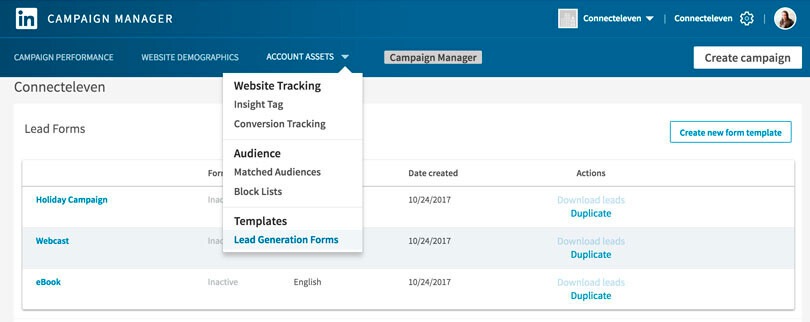
Sign in to LinkedIn Campaign Manager. From the left-hand navigation, click Assets, then select Lead Gen Forms and click Create form.
Step 2: Creating your lead gen form offer
Now you can describe the lead generation form offer you are promoting. That's the text that will encourage users to provide their contact details. For example, your offer might be a free software trial, eBook, discount, or other promotion.
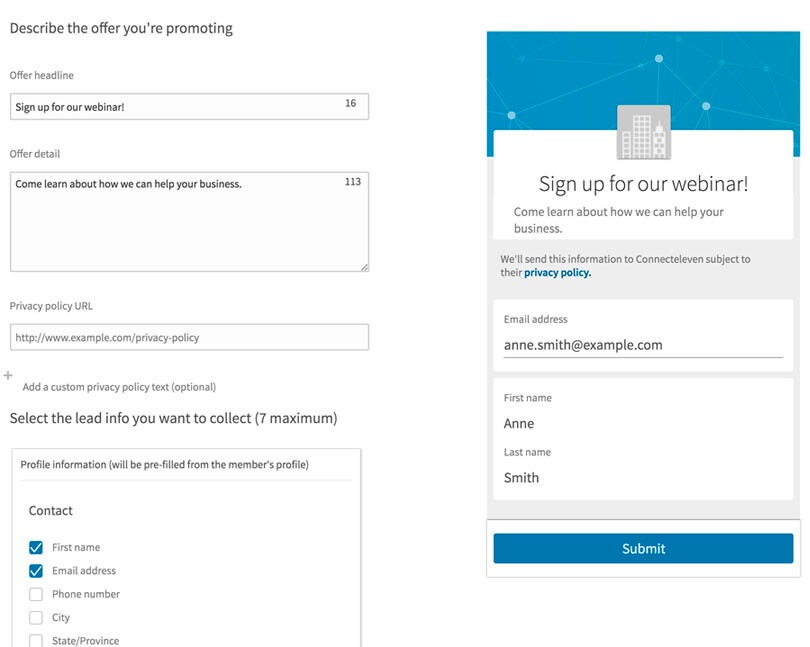
Write a compelling headline in the "Offer headline" section, such as "Sign up for a free trial." Then write a description of your offer in the "Offer detail" section, such as "Try out our software for 30 days with no credit card required."
You'll also need to add a Privacy policy URL; this field is required. Make sure the page it points to is current. That will tell users how you plan to use their data. You can preview your lead generation form on the right-hand side of your screen as you create it.
Step 3: Add lead gen form information
LinkedIn lets you select up to 12 profile fields to pre-fill in the form, plus you can add custom questions (multiple choice or short answer) to qualify leads further.
Our advice: Keep the form short. Every additional field lowers your submission rate. We usually start with three or four essentials — name, work email, company, and job title — and only add more if there's a specific qualification reason. If you need to ask a budget or timeline question, use a custom multiple-choice question instead of a free-text field.
Step 4: Publish lead gen form
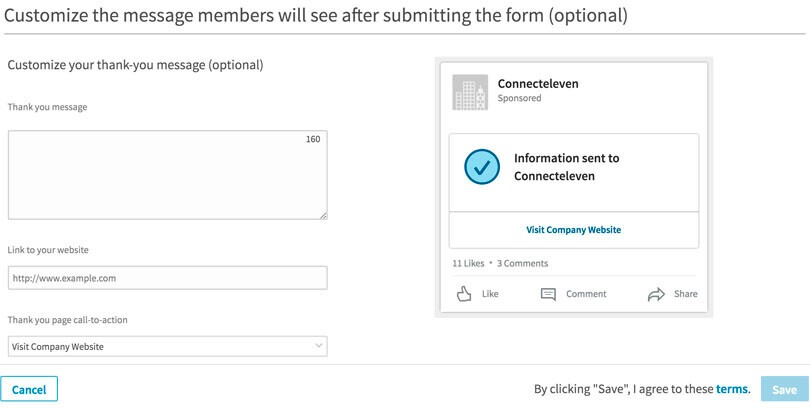
Finally, you can write a confirmation message that thanks users for signing up for your offer. Users will see this message after clicking "Submit" on your lead generation form.
After customizing your confirmation message text, you can also add a link to your website and a call to action to your form.
When you're done, click “create” to save and publish your form. You can then attach it to any new or existing eligible ad in your account.
LinkedIn Lead Gen Forms Examples
Here are a few examples of well-executed LinkedIn lead generation form text. For a broader look at what strong native creative looks like across formats and platforms, see our library of native advertising examples :
Gated research or report
- Offer headline: Get the 2026 State of B2B Marketing Report
- Detail: Benchmarks, trends, and tactics from 1,200+ marketing leaders. Free download.
Free trial
- Offer headline: Start your 14-day free trial — no credit card required
- Detail: Full access to every feature. Setup takes under five minutes.
Webinar registration
- Offer headline: Reserve your seat: Live webinar with [Industry Expert]
- Detail: Join us Thursday at 1 PM ET. Can't attend live? Register and we'll send the recording.
Free audit or consultation
- Offer headline: Request your free SEO audit
- Detail: Our team will analyze your site and send a personalized report within 48 hours.
A Few Things We've Learned By Running LinkedIn Lead Gen Forms
A few patterns we see across B2B client accounts:
- The offer matters more than the form: A boring offer with a perfect form will lose to a great offer with a mediocre form every time.
- Auto-fill is a double-edged sword: Lower friction means more leads, but also lower average intent than a landing page conversion. Plan your nurture sequence accordingly — these leads usually need a few more touches before they're sales-ready.
- Connect your CRM before you launch: Manually exporting CSVs from Campaign Manager is fine for testing, but leads go cold fast. A direct integration into HubSpot, Salesforce, or Marketo means sales gets the lead within minutes, not days.
- Refresh your creative every few weeks: LinkedIn audiences fatigue faster than most paid social channels.
Ready to Get More Out of LinkedIn?
LinkedIn Lead Gen Forms are one of the most effective tools available for B2B lead generation, offering high conversion rates, clean data, and minimal friction for the user. Follow the steps above to launch your own, then refine based on the performance data you collect.
If you'd rather have a team handle it for you, that's what we do. Our paid social services help B2B brands build LinkedIn campaigns that actually convert, from audience targeting and creative to Lead Gen Form strategy and CRM integration. Get in touch and let's talk about what a stronger LinkedIn program could look like for your business.
LinkedIn Lead Gen Form FAQs
Are LinkedIn Lead Gen Forms free?
Yes. There is no additional cost to use a Lead Gen Form itself. You only pay for the ad that hosts it, whether that is a Single Image Ad, Video Ad, Carousel Ad, Document Ad, Conversation Ad, or Message Ad.
Which LinkedIn ad types support Lead Gen Forms?
Lead Gen Forms can be attached to Single Image Ads, Video Ads, Carousel Ads, Document Ads, Conversation Ads, and Message Ads. Choose the format that best fits your offer and audience.
How many fields should a LinkedIn Lead Gen Form include?
Three or four essential fields is usually the right starting point. Common defaults are name, work email, company, and job title. Every additional field lowers your submission rate, so add more only if you have a specific qualification reason.
What is a typical conversion rate for LinkedIn Lead Gen Forms?
LinkedIn reports that Lead Gen Forms convert at roughly 13% on average, compared to about 4% for a standard landing page. The lift comes from the form auto-filling with a user's profile data and never leaving the LinkedIn platform.
Can I connect LinkedIn Lead Gen Forms to my CRM?
Yes. LinkedIn offers native integrations with HubSpot, Salesforce, Marketo, Zapier, and other tools. Connecting your CRM before launch means leads route to sales within minutes instead of sitting in Campaign Manager and going cold.
What makes a good LinkedIn Lead Gen Form offer?
The offer matters more than the form itself. Gated research, a free trial, a webinar with a recognizable speaker, or a personalized audit tend to outperform a generic "contact us" prompt. Match the offer to the funnel stage of the audience you are targeting.


.png)


.png)






